
This is the Model Town Board our simulator uses, laid out the way Kenyan driving schools paint it. Boards are not all identical, so have your school show you the one you will be tested on.
- 1Dual carriageway, four lanes each way
- 2Central reserve, with a gap for U-turns
- 3Roundabout, four lanes round the island
- 4Three-lane road with a yellow centre line
- 5Controlled parking zone, with angle bays
- 6Street joining the two bigger roads
- 7Two-way road
- 8Pedestrian crossing
- 9Flush parking at the kerb
How the lanes are numbered
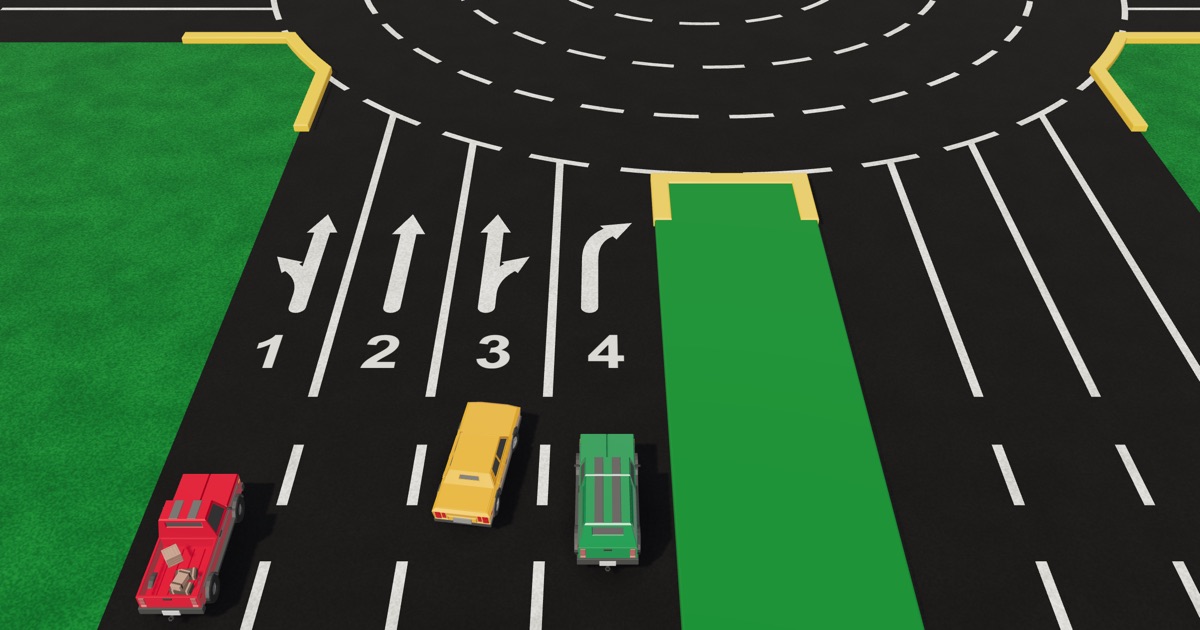
Lanes are counted from the kerb. Lane 1 is beside the kerb, and the highest number is beside the middle of the road. The dual carriageway has four lanes each way, so lane 4 runs beside the central reserve. The three-lane road has three each way, so lane 3 runs beside its yellow centre line. The roundabout's lanes are counted the same way, from the outside in.
The arrows painted in each lane show where that lane may go. The handbook sums them up as an option code: 2124 on the four-lane road and 215 on the three-lane road. The lane options page explains both.
How to read the board
Everything painted on the board is an instruction. Read it the way you would read a real road:
- The lines between lanes. A broken white line means you may change lanes if the road is clear. A continuous white line means you may not. Near the roundabout the lines turn continuous, so your lane is chosen before you reach them.
- The line down the middle. On the two-way road, a continuous yellow line means stay on your side. A broken yellow line means you may overtake or turn across it when the road is clear.
- The yellow kerb. It is the edge of the road. No stopping, parking or waiting beside it.
- The central reserve. It keeps the two directions of the dual carriageway apart. A gap in it is where a car can turn back.
- Stop lines, give way lines and crossings. Stop at a stop line even when nothing is coming. Give way to the major road at a give way line. Never stop on a pedestrian crossing.
- The parking zone. Angle bays and flush boxes. You drive through it only when there is no other correct route.
The Model Town Board rules covers each of these in full.
The roundabout, up close
The parking zone, up close
Every part of the board
- Roundabout
- Go round it clockwise, keeping left. Give way to traffic already on it, coming from your right. No stopping, waiting, parking, overtaking or changing lanes on it. Choose your lane before you reach it. The Roundabout ahead sign.
- Traffic island
- The green circle in the middle of the roundabout. You go round it and never over it. Only the lane beside it, lane 4, may go all the way round.
- Lane numbers
- Lanes are counted from the kerb. Lane 1 is by the kerb and the highest number is in the middle of the road. The roundabout's lanes are counted the same way, from the outside in.
- Lane arrows
- The arrow painted in a lane shows where that lane may go. The four-lane road is 2124: lane 1 has two options (straight or left), lane 2 one (straight), lane 3 two (straight or right) and lane 4 four (right, back, left the long way round, or straight after going round). The three-lane road is 215.
- Continuous white lines
- Near the roundabout the lines between lanes are continuous. That means no changing lanes: you should already be in the lane for your turn.
- Broken white lines
- Further back the lines between lanes are broken. This is where you may change lanes, so this is where you choose the lane for your turn. Check your mirrors and signal for 3 seconds before you move across.
- Dual carriageway
- Four lanes each way, with a central reserve keeping the two directions apart. It runs the length of the board and through the roundabout.
- Central reserve
- The raised green strip down the middle of the dual carriageway. It separates you from traffic coming the other way. You never drive over it.
- Gap in the central reserve
- A break in the reserve where a car can turn back onto the other side. Be in the lane beside the reserve first, and give way to traffic on the side you are joining.
- Three-lane road
- Three lanes each way with a continuous yellow line down the middle. A continuous yellow centre line means stay on your side: no crossing it to turn or overtake. Its option code at the roundabout is 215.
- Yellow kerb
- The kerbs at the junctions and round the island are painted yellow so they stand out. Stay off every kerb. A yellow kerb means no stopping, parking or waiting beside it.
- Two-way road
- One lane each way with a yellow line between them. Keep left of the line. Where the yellow line is continuous, stay on your side. Where it is broken, you may overtake or turn across it if the road is clear. The Two-way traffic ahead sign.
- Pedestrian crossing
- The white bars across the two-way road. Slow down as you reach one and be ready to stop before it. People on the crossing go first. No stopping, parking or waiting on it. The Pedestrian crossing sign.
- The street
- A short two-way road joining the dual carriageway to the two-way road. It has a give way line at one end and a stop line at the other.
- Stop line
- A thick continuous white line across your side of the road. You must stop at it every time, even when nothing is coming. Look right, left, then right again, and go only when the road is clear. The Stop sign.
- Give way line
- A broken white line across your side of the road. Slow down and let traffic on the road you are joining go first. Stop only if you need to. The Give way sign.
- Angle parking
- The controlled parking zone, also called ample parking: bays painted at 45 degrees on both sides of a two-way aisle. It is for small cars, not buses or heavy vehicles. Take the farthest free bay, drive in forwards and reverse out, with the whole car inside the lines. Only drive through here when no other correct route gets you there.
- Parking aisle
- The road through the parking zone. It is two-way, with a give way line at each end. Drive slowly: a car may pull out of a bay on either side.
- Flush parking
- Boxes painted along the kerb of the two-way road, in line with the traffic. Also called flash, parallel or uncontrolled parking. Any vehicle may use it except a trailer or a tractor, for a short stop. Take the farthest free box, reverse in and drive out forwards.
Drive it
Every part above is on the Model Town Board simulator. The first unit of levels points the camera at each one and says what it asks of you, before you drive. It is free, with no signup. Start with the four roads.
More on the Model Town Board
- The Model Town Board levelsThe board, the lanes and the rules first. Then you drive.
- Model Town Board lane options: 2124 and 2152124 and 215: which lane may take which turn.
- Model Town Board questions and answers (60+)Lanes, the roundabout, routes and parking, each with its rule.
- Model Town Board roundabout rulesClockwise, no stopping or changing lanes, and leaving right.
- Model Town Board rulesThe route rules, lane numbers, lines, kerbs, stop and give way.
- Model Town Board parking: angle and flushAngle and flush parking, and when to use the parking area.
Sources
- Kenya Learner Driver Handbook, compiled by NTSA, 2016, Unit 3: Model Town. We could not find it on NTSA's own site, so this copy is hosted by a driving school. Ask your school whether your test centre still follows it.
- The layout follows a board painted by a Kenyan driving school, with proportions measured from a reference drawing of it.